Ask people what storytelling in a presentation means and most describe an opening anecdote: a personal moment, a customer's struggle, a surprising fact. Those can help. But decks that persuade usually rely on something less visible: an order of ideas in which each slide answers the question the previous one raised.
That order is the story. This guide covers five storytelling frameworks for business presentations and when each one fits. Then it shows how to turn the one you choose into slides, with action titles and a storyboard you can sketch before anyone opens PowerPoint.
What storytelling means in a business deck
Whatever framework you use, a business story has three parts:
A starting point the audience recognizes. Their market, their numbers, their goal. If they don't recognize it, they won't trust what comes next.
Tension. Something changed, something is at risk, or something better is possible. Without tension, there's no reason to listen.
A resolution with an ask. What you propose, why it works, and what you want the audience to decide or do.
Frameworks are ready-made orders for those three parts. They stop you from opening with your company history, burying the recommendation on slide 19 or ending on "Questions?" with no ask.
Anecdotes still have a place. One short, true example, such as a customer you have permission to name or a single shift on a factory floor, makes an abstract problem concrete. Use it to illustrate one step of the structure, not to replace it, and keep it under a minute.
Story also comes before design. The layout rules in our guide to making a PowerPoint look professional, such as one idea per slide and titles that state the point, work far better once the order is fixed. For investor decks, our pitch deck guide shows how the same logic runs through a 12–15 slide main deck.
One test before you choose a framework: can you say the whole presentation in one sentence? "Waits are rising faster than patient numbers, so we should open evenings at three clinics" is a story. "An operations update" is a topic.
1. Situation, complication, resolution
This structure is widely used in consulting and business writing. It's the safest default for any deck that ends in a recommendation.
Situation: what's true and uncontroversial. The audience should nod.
Complication: what changed, what's at risk or what doesn't add up. This is why you're presenting today.
Resolution: what you recommend, why, and what you need.

Here's how it sounds for Brightfield Health, a fictional clinic group. Situation: patient numbers grew all year at every clinic. Complication: new patients now wait 11 days for a first appointment, up from 6. Resolution: add evening hours at three clinics to bring waits under a week.
Best for: recommendations to leadership, board decisions, project reviews that need a call, and executive summaries.
On slides: keep the situation to one slide, because the audience already knows it. Give the complication one or two slides with the evidence. Spend the rest on the resolution: the recommendation, the reasons, the cost and the ask.
For senior audiences, flip the order. State the resolution first, then use the situation and complication as your reasons. Leaders want the answer before the background, which is why our guide to presenting to executives opens every deck with the recommendation.
Watch for: a situation that runs to five slides of background. If the audience is waiting for the point, the complication arrived too late.
2. Problem, solution, proof
This sequence is common in sales, and it's the backbone of most pitch decks, sales decks and proposals. Its strength is that every claim gets tested before the ask.
Problem: who has it, what it costs them and why it matters now. Use the audience's words, not your product's.
Solution: how the problem goes away. Show it working rather than listing features.
Proof: evidence that it works, such as results with a source, a pilot, a demo or a customer quote you have permission to use.
Then comes the ask: a meeting, a pilot, a signature or an investment.
Best for: sales decks, investor pitches, proposals and product demos.
On slides: the problem gets one or two slides, ideally with a number or a scene the buyer recognizes. In a sales deck, a "cost of doing nothing" slide between the problem and the solution raises the stakes before you offer the fix. Our sales deck structure shows where it fits. Proof gets as many slides as it needs and no more.
Juniper Freight, a fictional logistics startup, might open with: "Small shippers lose a day a week booking trucks by phone." The solution slide shows a load booked in three clicks. The proof slide shows paying shippers growing from 35 to 140 in six months, with the source underneath.
Watch for: proof made of adjectives. "Trusted by leading brands" proves nothing. "140 paying shippers, up from 35 in March," with a source line, does.
3. Before, after, bridge
Common in marketing copy, this framework works whenever you're asking people to change how they do something.
Before: the world as it is now, with its friction.
After: the world once the problem is solved, described so concretely the audience can picture it.
Bridge: how to get from one to the other: your product, plan or project.
It's shorter than the other frameworks and shows contrast quickly. That makes it a good fit for launches, webinars, internal change proposals and the opening minutes of a longer talk.
Harbor & Pine, a fictional hotel group, could use it to propose a new front-desk system. Before: check-in means three systems and a ten-minute wait. After: one screen, and guests reach their rooms within three minutes of arriving. Bridge: a pilot at two hotels this winter, then the rest in spring.
On slides: "before" and "after" work well as a matching pair, with the same layout, photo angle or chart, changed. The bridge is usually a simple timeline or three steps. Our guide to product launch presentations uses a longer version of this arc for launch events.
Watch for: a vague "after". "A better guest experience" isn't a picture. "In their room within three minutes" is.
4. What is, and what could be
This is a known structure for persuasive talks. Instead of moving once from problem to solution, you alternate: here's how things are, here's how they could be. Then you do it again, with a sharper example each time. The gap grows until the audience wants it closed, and you end with a call to action and one last picture of what could be.
Best for: keynotes, conference talks, all-hands meetings and strategy talks. It suits any moment where people need to feel the change, not only approve it.
Meridian Water, a fictional utility, might alternate like this:
What is: we find most leaks when customers call us.
What could be: sensors find them before anyone notices.
What is: a crew drives out to look before it can fix anything.
What could be: the crew arrives knowing the spot, with the right parts on board.
Call to action: fund sensors in the North zone this year.
On slides: give "what is" and "what could be" a visual signature, so the audience feels the switch before you say it. For example, show "what is" in muted gray photography and "what could be" in full color, or always put the two on opposite sides of the slide. Keep text to a line or two, because on stage you carry the argument. Our guide to conference presentation slides covers designing for the room.
For examples of talk decks from our studio, see The Aligned Mindset keynote, a conference keynote deck, and our slides for a TEDx Westminster talk.
Watch for: all contrast and no ask. If the talk ends on the dream without a concrete next step, people leave inspired and do nothing.
5. The customer as the hero
This approach is common in marketing and sales. The customer is the main character, and your company is the guide. The audience sees their own goal, the obstacle in the way and a plan that gets them there, with you helping rather than starring.
The hero and their goal: what the customer wants to achieve, in their words.
The obstacle: what's stopping them, and what it costs.
The guide and the plan: why you understand the problem, and three clear steps.
Success: what their world looks like when the plan works.
The call to action: one next step, made easy.
Best for: sales meetings, customer case studies, renewals and QBR presentations, where the customer's goals should lead.
Northlake Analytics, a fictional analytics company, might open a meeting with a grocery chain like this: "You want every store stocked for the holidays, without overstock in January." Only then does Northlake appear, as the guide with a plan.
On slides: the customer's name, goals and words come first, and your logo stays small. The "About us" slide moves from slide 2 to just before the plan, cut down to the one reason you're qualified to help.
Watch for: the deck drifting back to you. Count the slides about your company and the slides about the customer. If yours win, rebalance.
Which framework to use
Most decks need one framework for the whole and, sometimes, a second inside a section. A board deck can run on situation, complication, resolution, with a short problem, solution, proof sequence inside the case for one option.
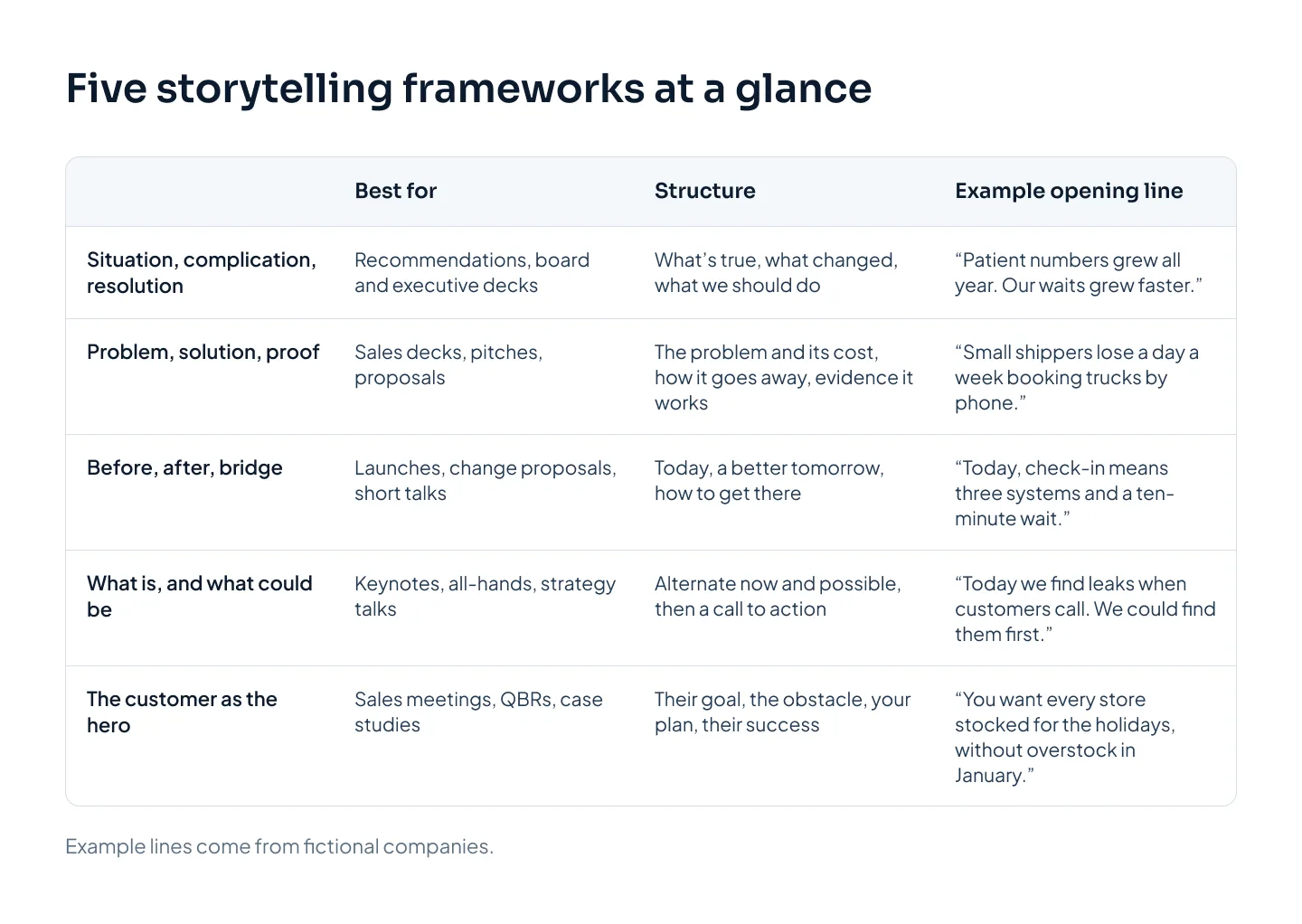
Use the deck you're building to choose:
| If you're presenting | Start with | Why it fits |
|---|---|---|
| A recommendation to leadership | Situation, complication, resolution, answer first | Leaders want the decision, then the reasons |
| A board update with an approval | Situation, complication, resolution | Shows what changed and what the board must decide |
| An investor pitch | Problem, solution, proof | Investors test every claim before the ask |
| A first sales meeting | The customer as the hero | The buyer's goals lead, your product follows |
| A proposal or a demo | Problem, solution, proof | Proof answers "will it work for us?" |
| A launch or change program | Before, after, bridge | One clear contrast shows the change |
| A keynote or all-hands | What is, and what could be | Builds the will to act, then asks for it |
If two frameworks seem to fit, choose the one that ends with the action you need. A recommendation ends in an approval. A talk that needs people to change ends in a call to action.
From framework to slides
A framework is a sequence of beats, not a slide count. Here's how to turn one into a deck.
1. Write the message and the ask
Write one sentence for the whole presentation and one for what you want the audience to do. Everything in the deck supports those two lines.
2. List the beats
Write the framework's parts as headings on a page and put your points under each. If a beat is empty, you've found a gap in the argument before the audience does.
3. Write an action title for every slide
An action title is the slide's point written as a full sentence. "Unplanned stops rose from 4 to 9 a month per site" is an action title. "Maintenance update" is a label. Keep titles to one or two lines, and make each one lead into the next.
Then read only the titles, in order, out loud. If they tell the whole story, the deck works. If they don't, fix the titles before you touch the design.
4. Storyboard before you design
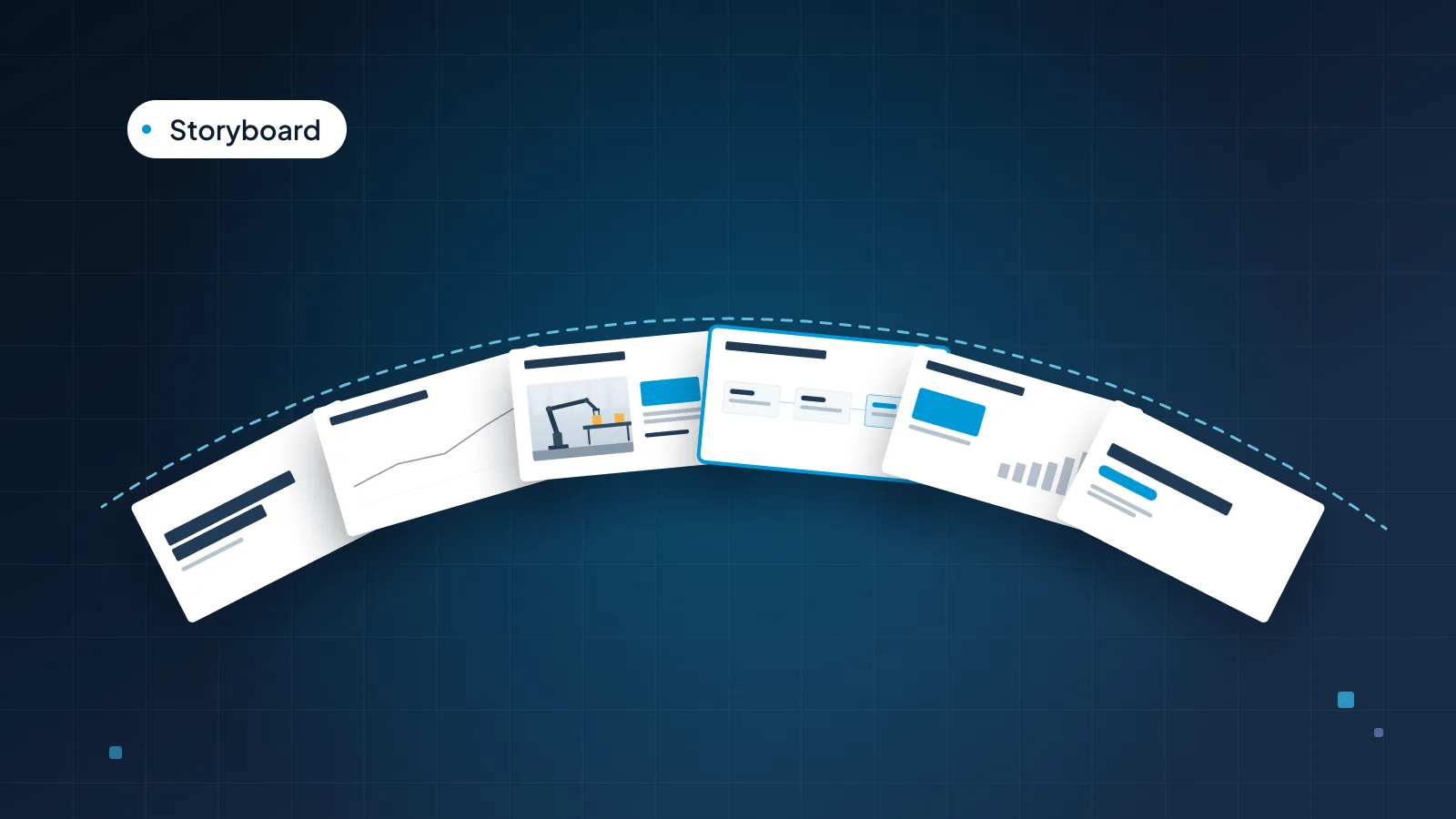
Sketch the deck as small boxes on paper, or as empty slides in PowerPoint's Slide Sorter view, with the action title above each one. Note what each slide will show: a chart, a photo, a big number or a quote. This is where you spot two slides making the same point, or six text slides in a row.
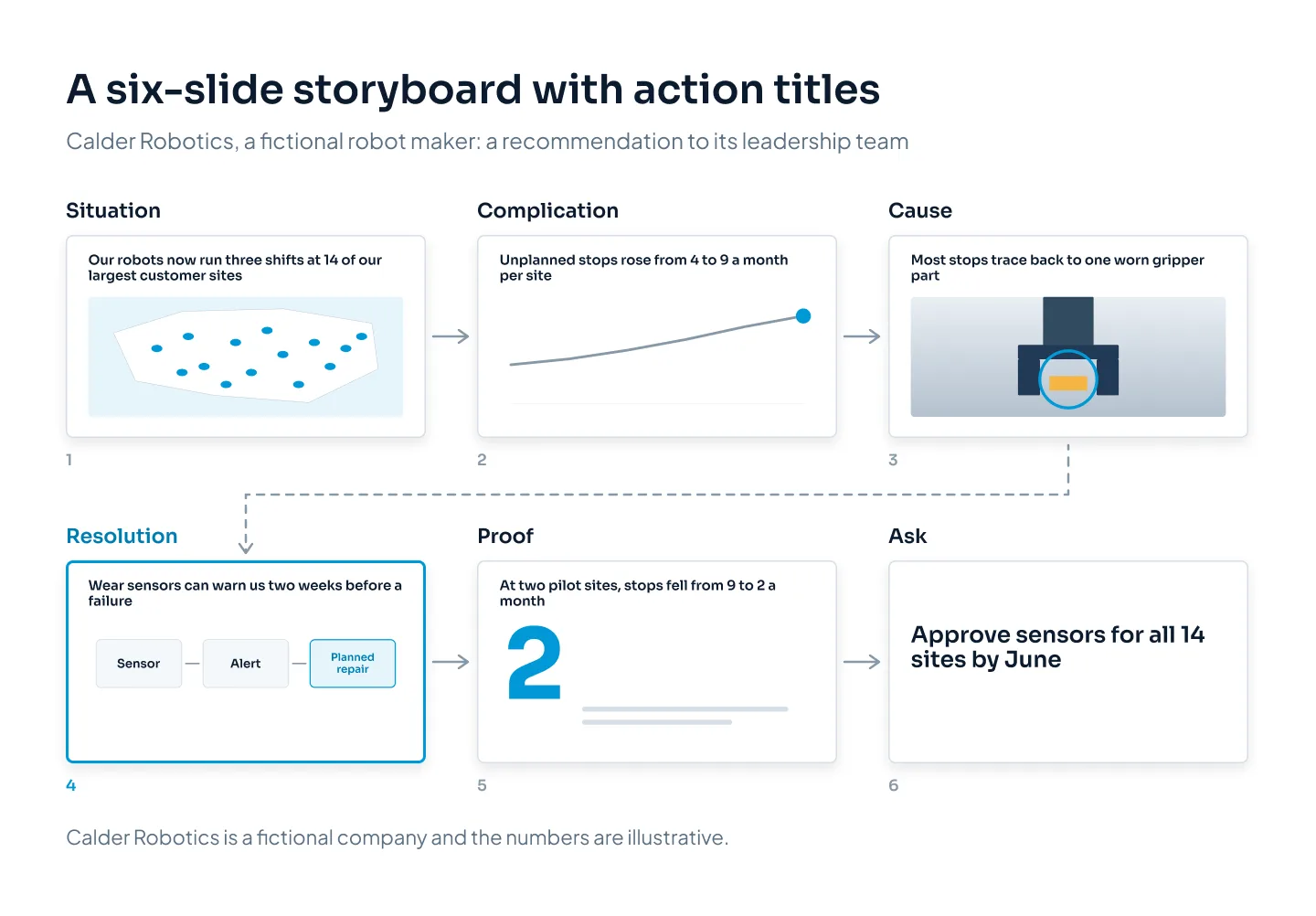
This storyboard is for Calder Robotics, a fictional robot maker, recommending wear sensors to its own leadership team. It runs situation, complication, resolution in six slides, with a cause slide and a proof slide added where the argument needed them.
5. Set up, then pay off
Each slide does one job in the story, and later slides answer earlier ones. If the complication slide says unplanned stops rose to 9 a month, the proof slide should show that same number falling. Audiences notice when a number from slide 2 returns on slide 5.
6. Let the design follow the beats
Design can make the structure visible:
Section dividers mark the beats in longer decks.
The accent color goes to the turning point: the complication's number, the recommended option or the result.
A quiet slide, such as one photo or one sentence, gives the key moment room.
Matching layouts for parallel slides, such as each option or each "what is" and "what could be" pair, let the audience compare without effort.
7. Decide: presented or sent
A presented deck can lean on you: fewer words, bigger visuals and the story in your voice. A deck that's sent has to carry the story alone, so action titles do more work, and the evidence sits on the slide or in an appendix. If you need both, build the sent version first, then cut it back for the room.
If the slide titles alone don't tell the story, no amount of design will.
If you have the story and want it designed, our PowerPoint presentation design service starts from your deck, document or notes. At Pixel Presentation, design is $10 a slide, or $15 for complex slides such as process diagrams and multi-series charts. Most 10–20 slide decks take 3–5 working days, and the pricing estimator shows the price for your deck before you order.